

Content Model
Understand the database-first approach.
Collections are the foundation of EmDash’s content model. Each collection represents a content type (posts, pages, products) and contains field definitions that determine the shape of your data.
Create collections through the admin panel under Content Types. Each collection has:
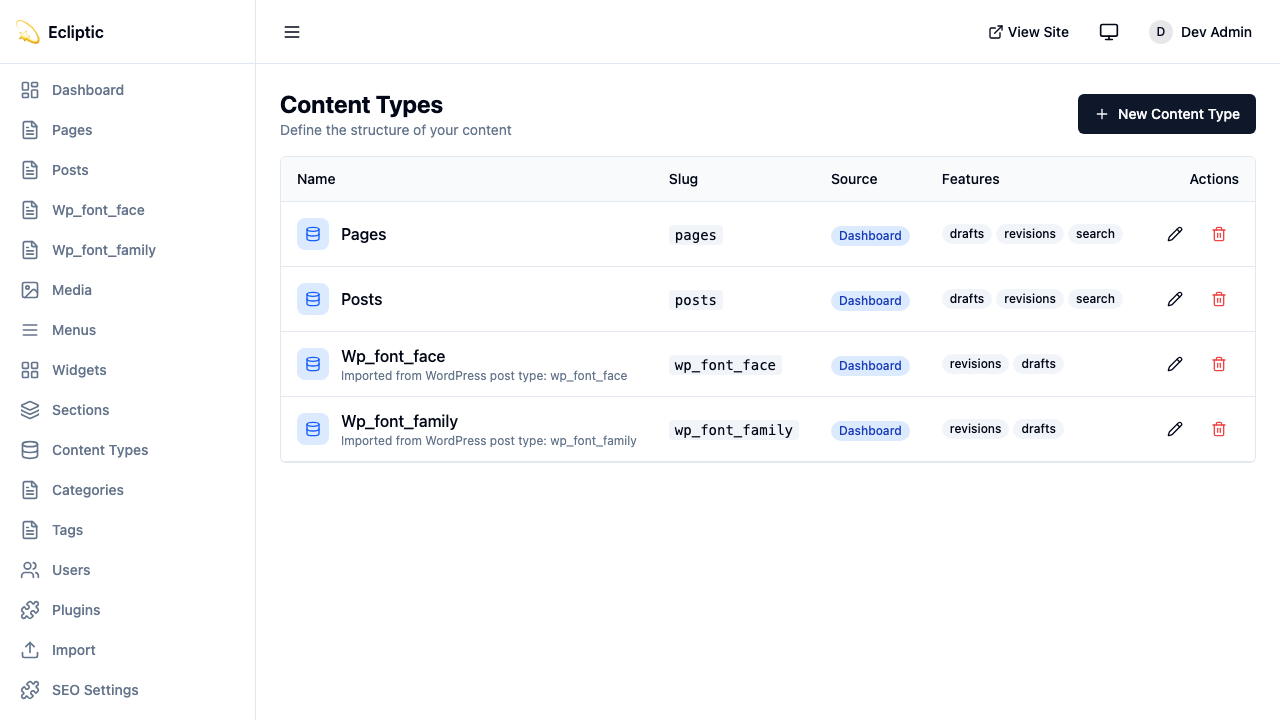
| Property | Description |
|---|---|
slug | URL-safe identifier (e.g., posts, products) |
label | Display name (e.g., “Blog Posts”) |
labelSingular | Singular form (e.g., “Post”) |
description | Optional description for editors |
icon | Lucide icon name for the admin sidebar |
supports | Features like drafts, revisions, preview, scheduling |
When creating a collection, enable the features you need:
| Feature | Description |
|---|---|
drafts | Enable draft/published workflow |
revisions | Track content history with version snapshots |
preview | Generate signed preview URLs for draft content |
scheduling | Schedule content to publish at a future date |
// Example collection with all features enabled{ slug: "posts", label: "Blog Posts", labelSingular: "Post", supports: ["drafts", "revisions", "preview", "scheduling"]}EmDash supports 15 field types that map to SQLite column types:
Short text input. Maps to TEXT column.
{ slug: "title", type: "string", label: "Title" }Multi-line textarea. Maps to TEXT column.
{ slug: "excerpt", type: "text", label: "Excerpt" }URL-safe slug field. Maps to TEXT column.
{ slug: "handle", type: "slug", label: "URL Handle" }Rich text editor (TipTap/ProseMirror). Stored as JSON.
{ slug: "content", type: "portableText", label: "Content" }Portable Text is a block-based format that preserves structure without embedding HTML.
Arbitrary JSON data. Stored as JSON.
{ slug: "metadata", type: "json", label: "Custom Metadata" }Decimal numbers. Maps to REAL column.
{ slug: "price", type: "number", label: "Price" }Whole numbers. Maps to INTEGER column.
{ slug: "quantity", type: "integer", label: "Stock Quantity" }True/false toggle. Maps to INTEGER (0/1).
{ slug: "featured", type: "boolean", label: "Featured Post" }Date and time picker. Stored as ISO 8601 string.
{ slug: "eventDate", type: "datetime", label: "Event Date" }Single option from a list. Maps to TEXT column.
{ slug: "status", type: "select", label: "Product Status", validation: { options: ["active", "discontinued", "coming_soon"] }}Multiple options from a list. Stored as JSON array.
{ slug: "features", type: "multiSelect", label: "Product Features", validation: { options: ["wireless", "waterproof", "eco-friendly"] }}Image picker from media library. Stores media ID as TEXT.
{ slug: "featuredImage", type: "image", label: "Featured Image" }File picker from media library. Stores media ID as TEXT.
{ slug: "attachment", type: "file", label: "PDF Attachment" }Reference to another collection’s entry. Stores entry ID as TEXT.
{ slug: "author", type: "reference", label: "Author", options: { collection: "authors" }}Every field supports these properties:
| Property | Type | Description |
|---|---|---|
slug | string | Column name in the database |
label | string | Display label in admin UI |
type | FieldType | One of the 15 field types |
required | boolean | Whether the field must have a value |
unique | boolean | Whether values must be unique across entries |
defaultValue | unknown | Default value for new entries |
validation | object | Type-specific validation rules |
widget | string | Custom widget identifier |
options | object | Widget-specific configuration |
sortOrder | number | Display order in the editor |
The validation object varies by field type:
interface FieldValidation { required?: boolean; // All types min?: number; // number, integer max?: number; // number, integer minLength?: number; // string, text maxLength?: number; // string, text pattern?: string; // string (regex) options?: string[]; // select, multiSelect}Example with validation:
{ slug: "email", type: "string", label: "Email Address", required: true, unique: true, validation: { pattern: "^[a-zA-Z0-9._%+-]+@[a-zA-Z0-9.-]+\\.[a-zA-Z]{2,}$" }}The options object configures field-specific UI behavior:
interface FieldWidgetOptions { rows?: number; // text (textarea rows) showPreview?: boolean; // image, file collection?: string; // reference (target collection) allowMultiple?: boolean; // reference (multiple refs) [key: string]: unknown; // Custom widget options}Example reference field:
{ slug: "relatedProducts", type: "reference", label: "Related Products", options: { collection: "products", allowMultiple: true }}Use the provided query functions to fetch content. These follow Astro’s live collections pattern, returning structured results:
import { getEmDashCollection, getEmDashEntry } from "emdash";
// Get all entries - returns { entries, error }const { entries: posts } = await getEmDashCollection("posts");
// Filter by statusconst { entries: drafts } = await getEmDashCollection("posts", {  status: "draft",});
// Limit resultsconst { entries: recent } = await getEmDashCollection("posts", {  limit: 5,});
// Filter by taxonomyconst { entries: newsPosts } = await getEmDashCollection("posts", {  where: { category: "news" },});
// Get a single entry by slug - returns { entry, error, isPreview }const { entry: post } = await getEmDashEntry("posts", "my-post-slug");
// Handle errorsconst { entries, error } = await getEmDashCollection("posts");if (error) { console.error("Failed to load posts:", error);}Run npx emdash types to generate TypeScript types from your schema:
// .emdash/types.ts (generated)export interface Post {  title: string;  content: PortableTextBlock[];  excerpt?: string;  featuredImage?: string;  author: string; // reference ID}
export interface Product { title: string; price: number; description: PortableTextBlock[];}Field types map to SQLite column types:
| Field Type | SQLite Type | Notes |
|---|---|---|
string | TEXT | |
text | TEXT | |
slug | TEXT | |
number | REAL | 64-bit floating point |
integer | INTEGER | 64-bit signed integer |
boolean | INTEGER | 0 or 1 |
datetime | TEXT | ISO 8601 format |
select | TEXT | |
multiSelect | JSON | Array of strings |
portableText | JSON | Block array |
image | TEXT | Media ID |
file | TEXT | Media ID |
reference | TEXT | Entry ID |
json | JSON | Arbitrary JSON |
Content Model
Understand the database-first approach.
Taxonomies
Organize content with categories and tags.
Media Library
Manage images and files.